
Crowning Glory: getting Adora’s coronation dress to pass
Build the yellow and white fabric layout first, then check quality and the two different trims. A white accessory cannot repair a missing white fabric share, and Lace Trim does not fulfil the ordinary Trim line.
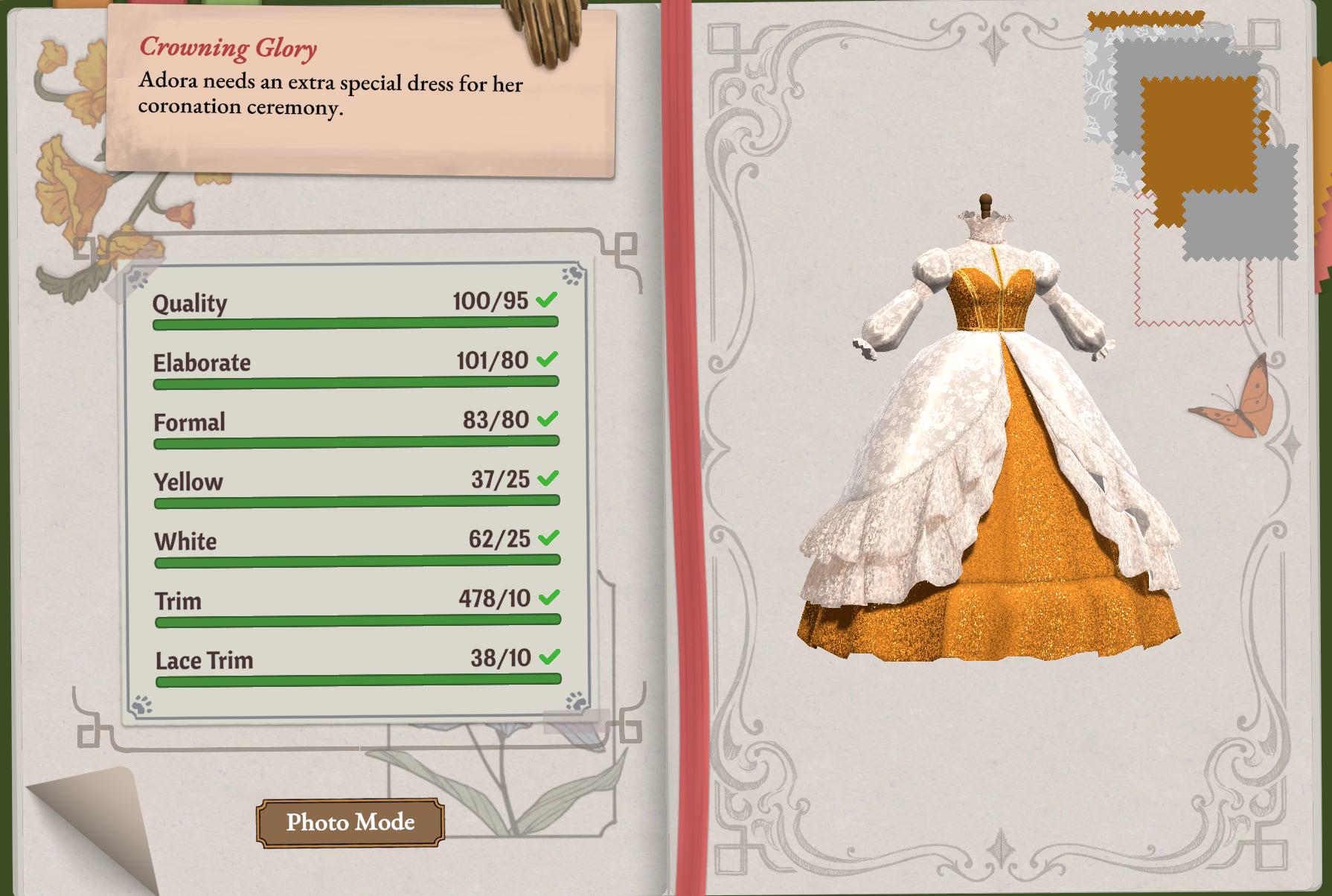
Adora’s complete brief
| Requirement | Target |
|---|---|
| Quality | 95+ |
| Elaborate | 80+ |
| Formal | 80+ |
| Yellow | At least 25% on the current colour readout |
| White | At least 25% on the current colour readout |
| Use 10cm of Trim | Required |
| Use 10cm of Lace Trim | Required |
The budget is 5000 gold. Elaborate and Formal are style scores; Yellow and White are fabric-composition percentages; Build 443 gives smaller parts extra weight. Check all the lines in the Crowning Glory commission checker before delivery.
If Quality stops at 94
Commission quality uses 30% grain, 20% fit and 50% sewing. It then rounds the result, with an exact half rounding to the even whole number. A raw result of 94.5 becomes 94. Better sewing is the largest lever, but a fit error can still keep a clean dress below the target.
Adora’s true measurements are bust 91.6 cm, waist 71.4 cm and hips 101 cm. Fit is checked against her body, rather than whichever tape values you saved. Compare the mannequin with the measurement table if the quality score is stubborn.
The starting scores are an example. Replace them with your dress’s scores; in mannequin mode, enter all three measurements.
Which readings should I enter?
- Grain: read Grain Quality on every cutting-table panel. The dress uses the average across all panels, not just the last piece. Only use 100 if every panel was cut at 100.
- Sewing: the sewing-machine percentage is for the current seam. The dress combines seams with different weights; the last seam’s percentage is not necessarily the whole dress’s Sewing score.
- Fit: choose Work it out from the mannequin and enter the bust, waist and hips used when the pattern was made. The mannequin’s accuracy display compares against your tape readings, not the client’s true measurements.
If you do not know the combined Sewing score, change it to compare scenarios. A scenario explains what could reach the target; it does not recover a hidden score from the final Quality number. For the cutting screen and formula, see where the numbers come from.
If Quality is still short, improve grain alignment and seam accuracy; paying more for fabric does not change this formula. Open the matching steps and keep these inputs
- Crowning Glory: 100 passes 95.
- Gift fallback: 100 is over 80, so a gift lands even if it misses her gift card. Gift cards
- 100% achievement: these inputs meet the score requirement; hand in, confirm the sale or gift the finished dress to trigger the check. 100 on the card but no achievement?
The calculator starts on this commission. Enter your grain, fit and sewing scores to see whether they reach the required quality and how much sewing you still need. The quality guide explains grain alignment and seam work.
If Yellow or White will not reach the target
- Recheck small parts after Build 443
A yellow skirt and white bodice or sleeves are a layout to try, but raw size no longer predicts the colour percentages. Read the updated game values before replacing cloth.
- Use the fabric’s colour tags
The game reads the fabric’s colour categories. A fabric with several colour tags divides its area between those tags. Check Yellow or White in the fabric finder; visual appearance alone can be misleading.
- Do not try to fix colour with accessories
Accessories do not enter the fabric-area calculation. Use the dress designer to explore a different layout; confirm colour percentages in the game while keeping Formal and Elaborate in view.
Trim and Lace Trim are separate lines
Place an ordinary Trim accessory and a Lace Trim accessory, then extend each type until its own line passes. Lengths add up across accessories of the same type. A long lace path still contributes nothing to the ordinary Trim requirement.
Filter by Type in the accessory finder to distinguish the two kinds. The accessory controls cover placing paths, flipping lace and removing a misplaced piece.
Save a working version before experimenting with the shape. If one line fails, fix that requirement first instead of rebuilding everything at once. Return to Adora’s orders for her other commissions.